


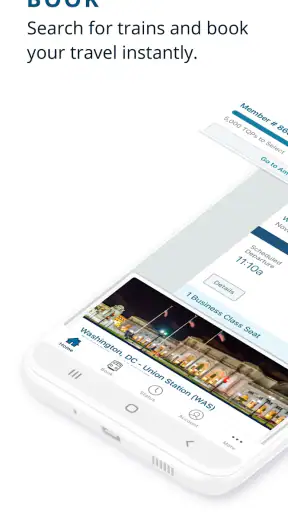
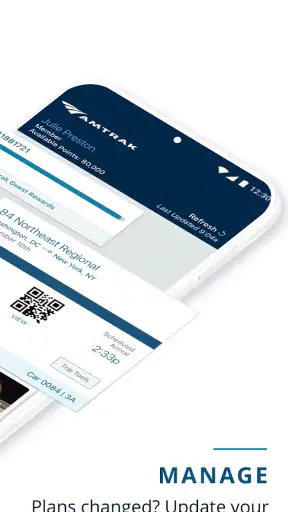
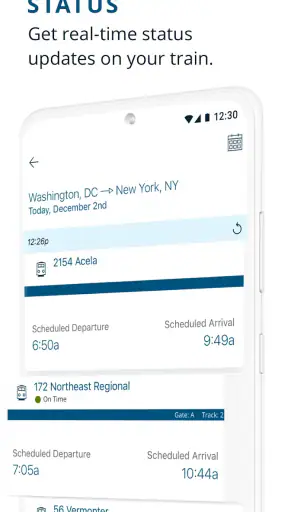
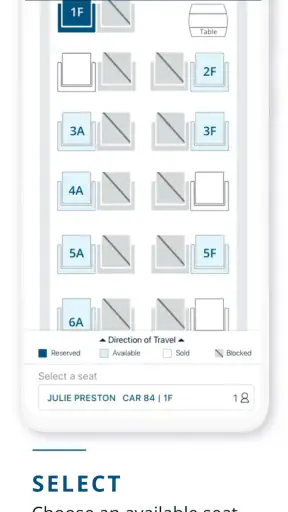
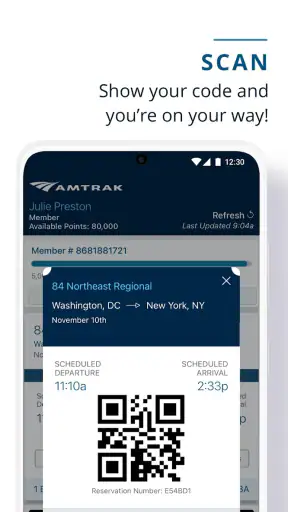
When I travel by train, the part that usually causes the most stress is not the ride itself. It is keeping the reservation, departure details, station information, and last-minute changes in one place. That is where Amtrak makes a convincing case for itself. This free travel and local app from Amtrak is built around managing an Amtrak journey from a phone, and in my experience its most useful capability is the way it puts the trip at the center instead of treating booking as the only important moment.
I would not describe it as a complete travel companion for every kind of journey. It is much more focused than a broad mapping app, hotel platform, or general transportation planner. But if Amtrak is already part of your route, having the railway’s own app available is more practical than relying on scattered emails, browser tabs, or a third-party travel service. The app has earned a 4.3 average from around 48 thousand ratings, with more than 5 million installs, which fits my impression: it is a well-established tool rather than an experimental extra.
Keeping the Amtrak trip together
The central idea is simple: your train trip should remain easy to revisit after you have made the initial arrangements. That sounds ordinary, but it changes how I use a travel app. Instead of searching through messages to remember what I booked, I can return to the railway’s own mobile experience when I need to check the journey again.
This matters most because train travel has several separate moments. I may plan the route at home, check it again before leaving, look at the details while heading to the station, and refer to it once I am already traveling. An app that only helps with the first step would be less valuable than one that continues to be useful afterward. Amtrak’s strongest role is this ongoing access to the trip rather than a one-time purchase screen.
I also like the fact that the app belongs directly to the operator. A general travel app can be helpful when I am comparing airlines, buses, hotels, and trains together, but it may not present an Amtrak journey with the same focus. The official app is the more natural choice when the train itself is the main part of the plan.
That focus has a trade-off. If I am still deciding between several transport companies, the app is not the place I would begin my entire search. It is better once Amtrak is a serious option, or when I already have an Amtrak reservation to manage. For a mixed itinerary involving several unrelated operators, I would still keep a broader travel tool or my own notes nearby.
What the focused design changes
The practical benefit is reduced mental clutter. I do not have to remember which website handled the booking, which message contained the relevant information, or whether I last viewed the journey on a laptop. The phone becomes the place I return to when the question is specifically about my Amtrak travel.
That is especially useful for people who do not travel frequently. Regular passengers may already know their preferred routes and habits, but occasional travelers often need reassurance at every stage. A dedicated app can make the journey feel less fragmented, even though it cannot remove every uncertainty that comes with traveling by rail.
My advice is to open the app before the day of departure, not for the first time while rushing toward the station. That gives me a chance to make sure the reservation is accessible, review the journey calmly, and notice whether I need any information that is easier to handle before leaving home. This is a small habit, but it is one of the most useful ways to avoid turning a phone tool into another source of last-minute pressure.
Using it during a normal travel day
Imagine a realistic weekday trip: I am taking an Amtrak train to visit family, carrying a small bag, and leaving work with little spare time. In the morning, I check the app to bring the journey back to mind. Later, instead of reopening an old confirmation message, I return to the app when I am preparing to leave. At the station, I have one dedicated place to consult rather than switching between email, a browser, and a calendar.
The value here is not dramatic. It is the quiet reduction of small decisions. Travel often becomes tiring because many minor details compete for attention. A focused official app helps me keep the train portion of the day separate from unrelated reservations, promotional messages, and general search results.
If my plans change, I would still treat the app as a tool for checking what is happening, not as a guarantee that every situation will be resolved automatically. Rail travel can involve station logistics, timing concerns, and questions that require human assistance. The app can support the trip, but I would not make it my only backup for an important connection.
For that reason, I keep the essential journey details available in a second form when the trip is especially important. A screenshot, a saved confirmation, or a written note can be sensible preparation. This is not a criticism unique to Amtrak; it is a general travel habit. Phones lose power, reception can vary, and an app should not be expected to replace basic preparation.
Where it fits beside other travel tools
Compared with a web browser, the app feels more direct for repeat access. A browser is perfectly capable of opening an Amtrak page, but it also leaves me managing tabs, logins, and unrelated browsing history. The dedicated app makes the railway journey feel like its own task.
Compared with a general travel aggregator, the advantage is concentration rather than breadth. An aggregator is better when I want to compare Amtrak with flights, buses, or other services in one search. It may also be more convenient for building a complicated multi-provider itinerary. The official app is better when I want to stay close to the Amtrak portion of the trip and avoid an extra layer between me and the operator.
Compared with paper or email, the app is easier to revisit and less likely to disappear among ordinary messages. Still, paper and saved messages have one advantage: they remain available when the phone is inconvenient or unavailable. I see the best approach as complementary rather than exclusive. Use the app for active management, and keep a simple backup for the moments when technology is least cooperative.
Small habits that make it more useful
One useful habit is separating planning time from departure time. I check the trip while I still have enough attention to deal with questions, rather than waiting until I am standing outside with luggage. This makes the app part of preparation instead of an emergency instrument.
A second is to use the official app as the reference point for the Amtrak segment, even when another service helped me organize the wider vacation. That prevents a common problem: one itinerary showing a simplified version while the operator’s own app contains the journey I actually need to manage.
A third is to think about battery and connectivity before the journey begins. I charge my phone, keep the app available, and save important information in a form I can consult if necessary. The app is most convenient when I treat it as one layer of preparation, not the entire preparation plan.
A fourth is to avoid confusing convenience with flexibility. The app can make an Amtrak trip easier to organize, but it does not turn a fixed rail journey into a completely open-ended plan. If I am someone who changes transport providers repeatedly or builds routes spontaneously across several companies, I may prefer a broader tool and use Amtrak’s app only for the specific train portion.
Who benefits most from the focused approach?
I think the app is particularly useful for occasional Amtrak passengers, people arranging a visit around a train journey, and travelers who dislike searching through email for reservation details. It also suits anyone who wants the operator’s own information close at hand instead of depending entirely on a third-party booking interface.
Families can benefit from the shared simplicity. When one person is responsible for the travel arrangements, a dedicated app makes it easier to return to the same trip while answering questions from other passengers. I would still make sure everyone knows the basic plan independently, especially if the group may separate at a busy station.
Business travelers may appreciate the reduced friction when a train journey is one part of a packed day. The app does not replace a calendar or expense workflow, but it gives the Amtrak segment a clear home. That is useful when I need to move from work mode to travel mode without reconstructing the itinerary from memory.
It is less compelling for someone who never travels with Amtrak, since its value depends on having an Amtrak journey to manage. It is also not my first recommendation for a traveler whose main goal is comparing every possible transport option. In that case, a general booking service or route planner should come first, with the official app added once the Amtrak choice is made.
What the app feels like to live with
Amtrak has been available since September 28, 2012, and the current release is version 6.1.7. Those details matter less to me than the overall maturity suggested by its long presence and broad adoption. I expect an official travel app to be dependable enough for repeated use, while also accepting that updates can change the arrangement of screens or the way familiar tasks are reached.
The app is free, which removes the main barrier to trying it before a journey. It is rated for Everyone, and it supports devices running Android 8.0 or later. That makes it approachable for many phone users, although anyone using an older Android device should check compatibility before relying on it for a trip.
My main reservation is not that the app lacks ambition; it is that no dedicated operator app can answer every travel question. It is strongest for the Amtrak relationship and the Amtrak journey. Questions about getting to the station, coordinating a hotel, finding alternatives across different carriers, or recovering from a wider travel disruption may still require other tools or direct assistance.
There is also a psychological limitation worth mentioning. Because the app is official and convenient, it can encourage me to assume that opening it is the same as being fully prepared. It is not. I still need to understand where I am going, allow enough time, and keep a backup of essential information. The app reduces friction; it does not remove the responsibility of traveling thoughtfully.
My recommendation after using it
I recommend Amtrak to anyone whose journey genuinely involves Amtrak and who wants a dedicated place to manage that part of the trip. Its best quality is not flashy entertainment or an attempt to become a universal travel platform. It is the practical decision to keep the railway journey close at hand throughout the travel day.
I would install it before booking or at least before departure, explore the journey area while relaxed, and prepare a basic backup for important travel. That combination gives me the convenience of a mobile tool without making the phone a single point of failure.
For broad travel comparison, I would choose a wider service first. For an Amtrak-centered trip, however, the official app is the more sensible companion. It is free, familiar, and focused on the part of the journey where clarity matters most. After using it, my view is straightforward: Amtrak is most valuable when you want less searching and more direct access to your train travel.


